
반응형
개요
중고로 구입한 Cisco Catalyst 2960-L(16포트) 제품에 기존 관리자 비밀번호, vlan이 구성되어 있어 초기화후 사용가능합니다.
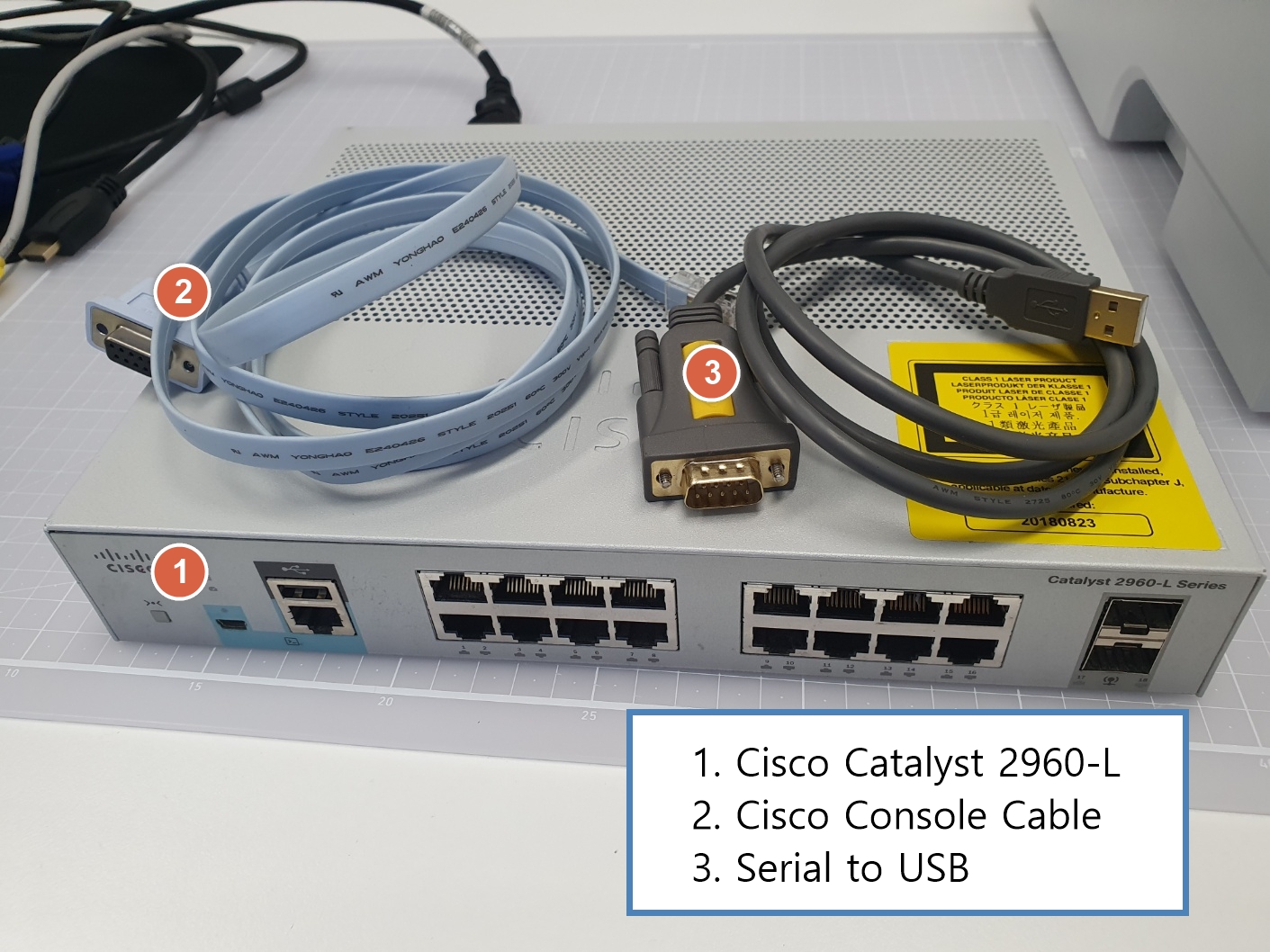
준비물
연결방법 (리커버리 모드 진입)
시스코 스위치 콘솔포트 -> 시스코 콘솔 케이블 -> USB to Serail 케이블 -> PC USB포트 (putty)
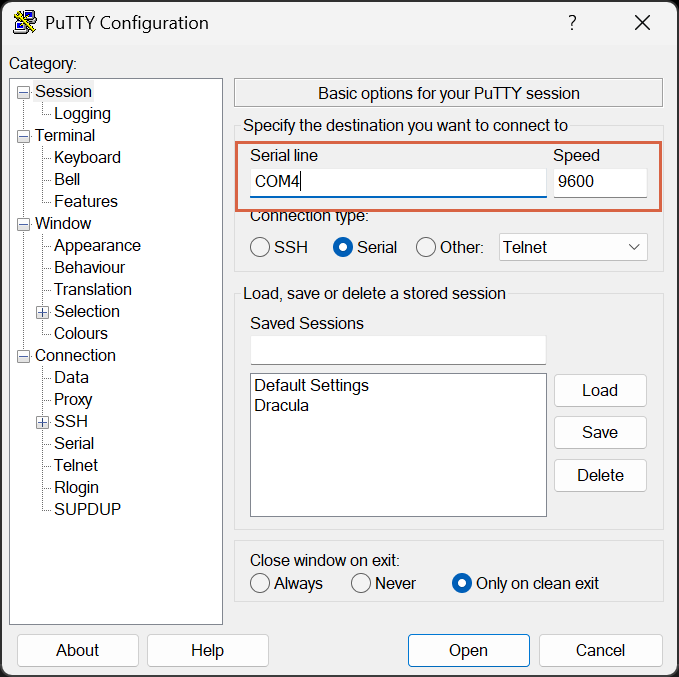
연결후 putty 실행, 아래와 같이 시리얼 접속후 대기

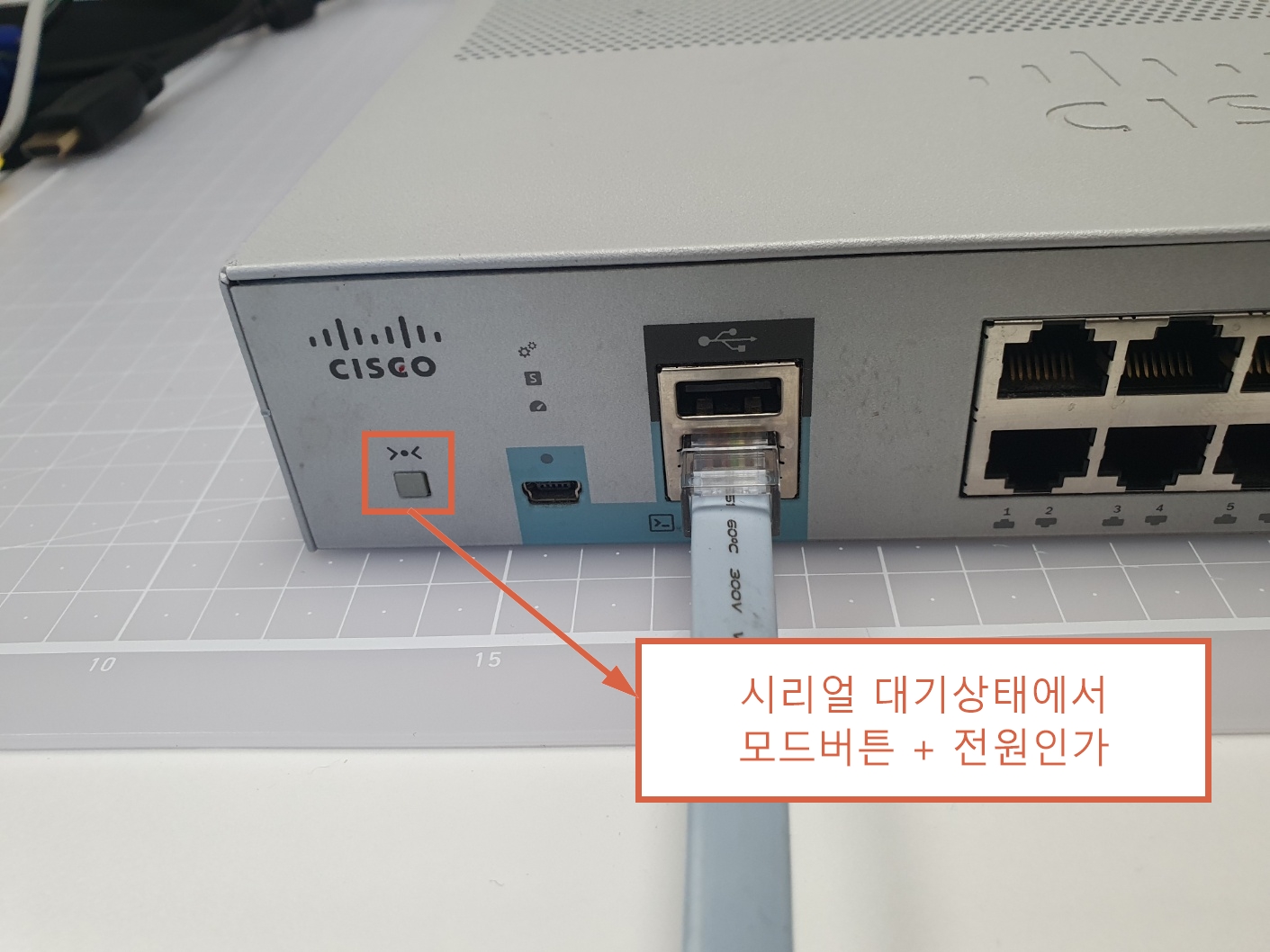
모드버튼 누른 상태에서 스위치 전원 인가
터미널 확인

스위치 초기화 (리커버리 모드)
- config.text 파일명 수정으로 기존설정 배제 (rename flash:config.text flash:config.backup)
- vlan.dat 삭제로 기존 vlan 설정 배제 (delete flash:vlan.dat)
- 재부팅 (boot)
switch: flash_init
switch: dir flash:
Directory of flash:/

  516  drwx  2048      <date>               c2960l-universalk9-mz.152-6.E
  707  drwx  2048      <date>               dc_profile_dir
  258  -rwx  676       <date>               vlan.dat
  774  -rwx  1922      <date>               private-config.text
  514  -rwx  2324      <date>               config.text
  513  -rwx  2072      <date>               multiple-fs
    2  drwx  2048      <date>               lost+found

210706K bytes available (28270K bytes used)

- config.text파일명 수정
switch: rename flash:config.text flash:config.backup
- vlan.dat 삭제
switch delete flash:vlan.dat

Are you sure you want to delete "flash:vlan.dat" (y/n)?y
File "flash:vlan.dat" deleted

- 재부팅
switch: boot
시스코 초기 설정마법사 실행 안함 (Would you like to enter the initial configuration dialog? [yes/no]: no)
AutoInstall은 네트워크 기반 자동설정 기능, 사용하지 않는경우 종료(yes) (Would you like to terminate autoinstall? [yes]: yes)
--- System Configuration Dialog ---

Enable secret warning
----------------------------------
In order to access the device manager, an enable secret is required
If you enter the initial configuration dialog, you will be prompted for the enable secret
If you choose not to enter the intial configuration dialog, or if you exit setup without setting the enable secret,
please set an enable secret using the following CLI in configuration mode-
enable secret 0 <cleartext password>
----------------------------------

- 시스코 초기 설정마법사 실행 안함
Would you like to enter the initial configuration dialog? [yes/no]: no

- AutoInstall은 네트워크 기반 자동설정 기능, 사용하지 않는경우 종료
Would you like to terminate autoinstall? [yes]: yes

Press RETURN to get started!


Dec 18 06:48:52.047: %LINK-5-CHANGED: Interface Vlan1, changed state to administratively down
Dec 18 06:48:58.136: SMI Director is not configured, disabling SMI
Dec 18 06:48:58.136: disable_smartinstall_operation:Disabling SMI
Dec 18 06:49:28.136: SMI Director is not configured, disabling SMI
Dec 18 06:49:28.136: disable_smartinstall_operation:Disabling SMI
Switch>
Smart Install 비활성화
- 관리자 권한 진입
Switch>enable

- config 모드 진입(Global Configuration Mode)
Switch#configure terminal
Enter configuration commands, one per line.  End with CNTL/Z.

- Smart Install (중앙 관리 장비(L2/L3)에서 설정 및 IOS를 배포하는 기능)비활성화
Switch(config)#no vstack

- config 모드 종료
Switch(config)#end

- 메모리 기록
Switch#write memory
Building configuration...
[OK]

- 설정확인
Switch#show startup-config | include vstack
no vstack

Switch#show vstack config
 Capability: Client
 Oper Mode: Disabled
 Role: NA
 Vstack Director IP address: 0.0.0.0
재부팅
Switch#reload
vlan 초기화 확인 (show vlan brief)
Switch>show vlan brief

VLAN Name                             Status    Ports
---- -------------------------------- --------- -------------------------------
1    default                          active    Gi0/1, Gi0/2, Gi0/3, Gi0/4
                                                Gi0/5, Gi0/6, Gi0/7, Gi0/8
                                                Gi0/9, Gi0/10, Gi0/11, Gi0/12
                                                Gi0/13, Gi0/14, Gi0/15, Gi0/16
                                                Gi0/17, Gi0/18
1002 fddi-default                     act/unsup
1003 token-ring-default               act/unsup
1004 fddinet-default                  act/unsup
1005 trnet-default                    act/unsup
STP(Spanning Tree Protocol) 설정 확인
Switch>show spanning-tree summary
- Rapid-PVST 모드로 STP가 동작 중이며, 네트워크 루프를 빠르게 차단하고 포트 상태를 신속하게 복구함
Switch is in rapid-pvst mode
Root bridge for: none
EtherChannel misconfig guard            is enabled
Extended system ID                      is enabled

- PortFast / BPDU 관련설정 (스위치<->스위치 트렁크 연결 시 STP 문제를 방지하기 위해 기본 비활성화)
Portfast Default                        is disabled
Portfast Edge BPDU Guard Default        is disabled
Portfast Edge BPDU Filter Default       is disabled

Loopguard Default                       is disabled
PVST Simulation Default                 is enabled but inactive in rapid-pvst mode
Bridge Assurance                        is enabled
UplinkFast                              is disabled
BackboneFast                            is disabled
Configured Pathcost method used is short

Name                   Blocking Listening Learning Forwarding STP Active
---------------------- -------- --------- -------- ---------- ----------
Total
스위치 초기화 요약 (명령어)
switch: rename flash:config.text flash:config.backup
switch: delete flash:vlan.dat
switch: boot
Would you like to enter the initial configuration dialog? [yes/no]: no
Would you like to terminate autoinstall? [yes]: yes
Switch> enable
Switch# conf t
Switch(config)#no vstack
Switch(config)#end
Switch#write memory
Switch#reload
'컴퓨터관리' 카테고리의 다른 글
| 윈도우11 검은화면에 마우스 커서 10~15분 바탕화면 나오는 증상 (0) | 2026.02.06 |
|---|---|
| \\컴퓨터\c$ (윈도우 관리자 공유) 활성화 방법 (0) | 2026.01.18 |
| PL2303TA USB to Serial 칩 윈도우11 차단 해결방법 (0) | 2025.12.18 |
| 4K 모니터 + FHD 모니터 DPI 설정 (0) | 2025.12.11 |
| Kingston NV3 M.2 NVME 2280 1TB 성능테스트 (0) | 2025.10.02 |
